



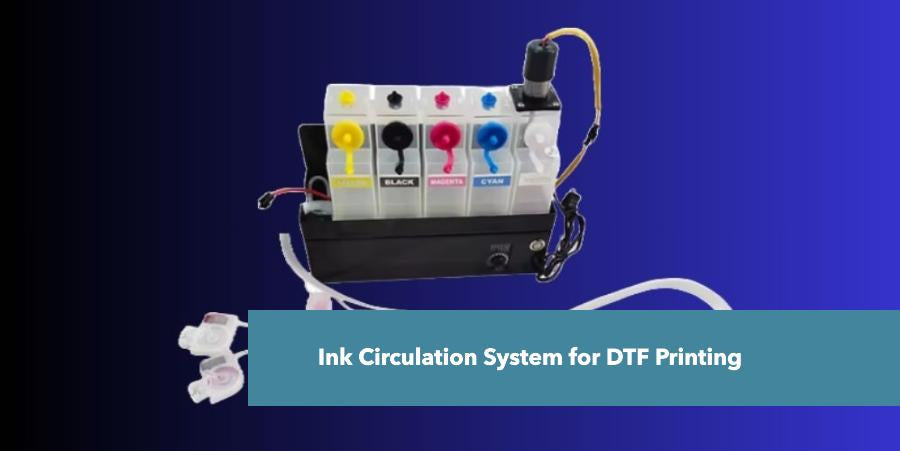
What is an Ink Circulation System?
An ink circulation system is a component within a printer that continuously moves ink through the printer's components to prevent it from drying, clogging, or settling.
How Does Ink Circulation System Work?
An ink circulation system is essentially a miniature plumbing system within a printer that ensures a constant flow of ink to prevent drying, clogging, and sedimentation. Here's a simplified breakdown:
Ink Reservoir: The ink is stored in cartridges or tanks.
Pump: A small pump creates suction, pulling the ink from the reservoir.
Ink Lines: The ink is transported through narrow tubes or lines to the printhead.
Printhead: The ink is expelled through the printhead to form the image.
Return Path: After passing through the printhead, the ink is often returned to the reservoir or a holding tank to be recirculated.
Key components and their functions:
Pump: The main component of the system, it creates the pressure to move the ink.
Filters: These can be placed at various points to remove impurities and prevent clogs.
Dampers: These regulate the ink flow to the printhead, preventing excessive pressure.
Check valves: Prevent ink from flowing backward, ensuring one-way movement.
Heat elements: In some systems, heat is used to maintain ink viscosity.
What is a White Ink Circulation System?
A white ink circulation system is a specialized component in DTF printers designed to prevent sedimentation and clogging of white ink, and it is helpful to create vibrant custom DTF transfers in DTF printing.
How Does White Ink Circulation System Work?
The system constantly circulates the white ink through the ink lines and printhead. This continuous movement prevents the ink pigments from settling at the bottom of the ink tank or clogging the printhead nozzles.
Why is the White Ink Circulation System Important?
White ink is important due to its pigment composition and is particularly prone to settling and forming clumps, which can significantly impact print quality and cause printhead damage. Learn more about white ink problems and their solutions through our guide.
What are the Benefits of the White Ink Circulation System?
The benefits of the White ink circulation system include its clogging prevention, increased print quality, and extended print life.
Prevents clogging: Ensures smooth ink flow and prevents printhead damage.
Maintains ink consistency: Prevents sedimentation and color variations.
Increases print quality: Delivers consistent and high-quality white ink prints.
Extends ink life: Reduces ink wastage due to clogging.
What is the Cost of the White Ink Circulation System?
The Cost of the white ink Circulation system ranges from $100 to $1500. based on market conditions, specific features, and the region you're purchasing from.
General Price Range
For a basic white ink circulation system, you can expect to pay anywhere from $100 to $500 USD.
This range covers most standard systems that include a pump, tubing, and possibly a filter.
Higher-End Systems
If you require advanced features like DTF temperature settings, multiple filters, or specific compatibility with your printer model, the price can go up to $500 to $1500 USD.
Recommended Circulation Settings and Flow Rate for White Ink in DTF Printing
You should keep white ink in DTF printing circulating slowly but consistently – for most setups that means about 30–50 mL/min for small desktop printers and around 100–200 mL/min for larger external pumps, with the pump speed set in the mid-range (roughly 50–65% power) and the ink kept at a viscosity of about 15–20 cP at room temperature so it flows smoothly without clogging.
Below is a simple, practical step-by-step way to dial this in
Start With The Right White Ink Condition
Check Viscosity
Most DTF white inks work best around 15–20 cP (centipoise) at room temperature (about 20–24°C / 68–75°F).
If it’s too thick, it will strain the pump and clog heads.
If it’s too thin, it can separate and give weak coverage.
Gently Mix The Ink
Before printing, you shake the dtf white ink bottle or let the built-in stirrer run for a few minutes so the heavy pigment is evenly suspended.
This gives you a stable ink that actually behaves correctly when you set the circulation speed.
Use the Manufacturer’s Baseline as Your Starting Point
Read your printer or pump manual first.
Many models (for example, Ricoma DTF printers) recommend setting the white-ink circulation pump speed around 50–65% on their control knob as a baseline.
Ricoma Support
If your manual gives mL/min, use that value.
Follow those numbers first and only fine-tune if you see problems like bubbles, empty dampers, or excessive foaming.
Think of everything below as “tuning around” the factory recommendation, not replacing it.
Set a Safe Flow Rate For Your Printer Size
Small/desktop DTF printers
For converted or small models (e.g., printers similar to L805):
A white ink circulation flow rate of about 30–50 mL/min is generally considered safe to keep pigment moving without over-pressurizing the system.
If your pump has only a speed dial (no mL/min numbers):
Start around the mid-range (roughly 50% power) and adjust up or down slightly while watching the ink lines.
Larger or External Circulation Systems
Many dedicated white-ink circulation pumps for DTF/DTG are designed for ~100–200 mL/min flow for stable white-ink management.
Example pumps and systems list 100–200 mL/min as “optimized” for white ink circulation in DTF/DTG printers.
In this case, you can:
Start around the low to mid range (e.g., 100–150 mL/min).
Only go higher if your lines are long or your heads are far from the tanks and you see ink moving too slowly.
Your goal is steady, gentle flow, not a high-pressure flush.
Choose a Circulation Schedule
Continuous Low Speed Circulation
Many modern DTF printers keep white ink circulating , at a low flow rate.
This works well if your pump and tubing are designed for continuous use.
Timed or Interval Circulation
Some systems run the pump on a timer, for example a few minutes every 20–60 minutes, or every couple of hours.
On these, you set the knob around the recommended 50–65% speed and let the built-in timer handle the cycle.
When idle for long periods
If you don’t print daily, you still want the printer to circulate white ink several times a day so it doesn’t settle in the lines and dampers.
You’re basically preventing pigment from parking in one place long enough to form sludge.
Visually Check The Flow And Adjust
Once you’ve set speed/flow, you can fine-tune just by watching what happens:
Look at the ink lines and dampers.
You should see steady movement of white ink during circulation, with no big air bubbles.
Both dampers (if you have two) should fill evenly; if one stays empty, flow may be too fast or unbalanced.
If the flow seems too slow:
The lines look still or get cloudy with settled pigment.
You can slightly increase the flow rate (or turn the speed knob up a little) and check again.
If the flow seems too fast:
You see foaming, turbulence, or ink backing up in dampers.
Lower the flow a bit until movement is smooth and calm.
You’re aiming for smooth circulation without foaming or pressure spikes.
Maintain Filters And Circulation Components
Keep filters clean.
Specialized white-ink circulation systems often use fine filters (e.g., around 2–5 µm) to stop pigment chunks from reaching the head
Replace or clean filters on the schedule the manufacturer recommends.
Check tubing and pump regularly.
Make sure tubing isn’t kinked or pinched.
Listen for unusual pump noise (grinding, rattling) that might mean blockage or air.
Good circulation settings won’t help if the system itself is dirty or worn.
Keep an Eye On Print Results And Adjust
Signs your flow is about right:
Solid, opaque white underbase.
No banding or faint white lines.
Minimal head clogs with normal maintenance.
Signs you should re-tune settings:
Frequent white-channel clogs or missing nozzles.
Thin, patchy white on dark garments.
One damper always fuller than the other.